How to Build a SaaS Product in 7 Days for Under $200: The Complete 2026 Playbook
The exact step-by-step process to go from validated idea to working SaaS with real user feedback in one week — using Lovable, Claude Code, Cursor, Supabase, and Vercel.
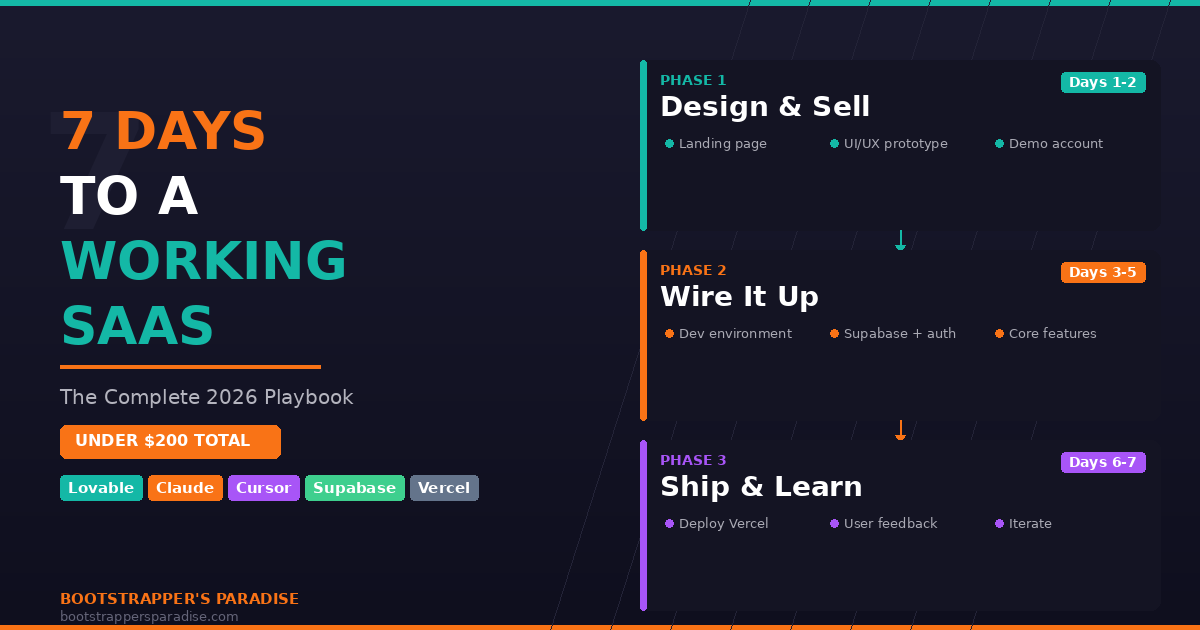
In 2026, you can go from a validated idea to a working SaaS product with real users giving you feedback in seven days. Not seven months. Not seven weeks. Seven days. And the total cost for every tool involved? Under $200 a month.
I know because I've been doing it. This is my exact process — step by step, tool by tool, day by day. No fluff, no theory, just the playbook I use right now.
The Four Phases
Before diving into each day, here's the 50,000-foot view.
Phase Zero is validation. This is your pre-work: problem interviews, competitive research, making sure you're solving something people actually care about. This is not part of the seven-day build. If you haven't validated yet, go do that first. Without validation, all you're doing is building something nobody wants faster.
Phase One (Days 1-2) is designing and selling. You build a landing page and a UI/UX prototype with a tool like Lovable. By the end of day two, you have something you can both sell and demo.
Phase Two (Days 3-5) is wiring everything up. You move the codebase into a development environment like Cursor or Claude Code, then make the UI/UX functional by adding a backend and database.
Phase Three (Days 6-7) is shipping and learning. You deploy to production and get it into real users' hands as fast as possible so they can start providing feedback.
Why I Start With Lovable
Some people want to jump straight to code. That's a mistake. Starting with a visual design tool gives you three critical advantages.
First, speed. You can have a professional landing page and a full UI/UX prototype in minutes to hours, not days to weeks. Second, you can start selling before you've built anything. The landing page captures leads while you're still designing the product. Third, iterating visually is ten times faster than iterating in code. Debating layouts and user flows in a visual tool saves massive amounts of time.
Day 1: Landing Page (Your Sales Tool)
Your landing page comes before your product. It explains the problem you solve, how you solve it, and builds enough trust to convert prospects into leads or paying customers.
Use Claude to workshop an ideal prompt for Lovable, then iterate conversationally from there. Connect your custom domain. By the end of day one, you should be live with the ability to capture leads.
Lovable isn't the only option here. V0 by Vercel and Magic Patterns are both excellent alternatives. Sometimes I test all three and pick a winner.
Day 2: UI/UX Prototype + Demo Account Pattern
Day two shifts from selling to designing the actual product experience. Build the core user workflow — the one thing your product does — plus the dashboard, navigation, settings, and page structure. Don't worry about perfect data or backend logic. Use sample data. Focus on the flow feeling right.
Here's a strategy I use for the right project: instead of hiding the dashboard behind a login wall, convert it to a public demo account that anyone can explore. No signup required. This is a product-led qualification tactic. Prospects see exactly what they're getting before they commit. The people who reach out after seeing the demo are already warm — they've sold themselves.
By end of day two, you have a live landing page collecting leads and a fully interactive demo. You can sell and you can demo. That's incredibly powerful for a two-day investment.
Day 3: The Engineering Handoff
Day three is the transition from design to engineering. Connect Lovable to GitHub (it has a native integration with two-way sync), push your project to a repo, clone it locally, and open it in your development environment — Cursor, Claude Code, or both.
Lovable typically generates a Vite/React single-page app. That's fine for prototyping, but for production you'll likely want to migrate to Next.js for server-side rendering, SEO, and API routes.
This day is all foundation work. Set up your environment variables — and I cannot stress this enough: never commit your .env file to GitHub. Bots scan GitHub constantly for exposed API keys. I've seen founders get hit with thousands of dollars in fraudulent charges within hours. Use a .env.example file and add .env to your .gitignore.
Configure your Supabase client: auth flow (login, logout, callback routes), database schema with tables, and row-level security policies. Security first, always.
Days 4-5: Core Features and Polish
Day four is about wiring the primary workflow to real data. Build the API routes that power core features, replace mock data with real Supabase queries, and get the core loop working end to end: user does a thing, data gets processed, result shows up.
Day five is polish and edge cases. Error handling, loading states, form validation, responsive fixes, and testing the full user flow from start to finish.
Context Engineering, Not Vibe Coding
This is where most people fail. They open Claude Code and type "build me a billing system." That's vibe coding, and vibe coding produces slop.
Here's what I do instead. First, create a CLAUDE.md file. This documents your project's rules, conventions, and architecture decisions. Claude reads it on every interaction. Second, write clear acceptance criteria. Not "build a client page" — instead, "build an API route at /api/clients that accepts POST requests with name, email, billing rate fields, validates them, stores them in Supabase, and returns the created client with a 201 status." Third, small focused tasks. One route at a time, one component at a time. Verify it works before moving on. Fourth, test-driven prompts. Write tests first, then implement. Tests catch regressions, serve as your specification, and give you confidence to ship.
The model matters less than the context you give it. That's the core principle: context engineering, not vibe coding.
Day 6: Deployment
With Vercel, deployment is almost anticlimactic. Push to GitHub and Vercel auto-deploys. Set your environment variables in Vercel settings. Configure your custom domain. Enable analytics.
On the Supabase side, update your auth redirect URLs for the production domain and make sure row-level security is enabled on every table.
Run through the checklist: pages render, auth works, core features are functional end to end, forms submit, mobile looks acceptable (not perfect, but acceptable), and no console errors.
It does not need to be perfect. It needs to work. Perfect is the enemy of shipped.
Day 7: The Most Important Day
Day seven is the day most founders never reach. It's the day you stop building and start learning.
Your first users should be the people from your validation interviews who said they'd try it, your email list signups from day one, and warm contacts from your target niche. Don't aim for the general public yet.
Ask them: Did the core workflow make sense? Was there a moment you got confused? What's the one thing you'd add or change? And the ultimate question: how valuable is this for you?
Have direct conversations — Zoom calls, phone calls. Watch them use it over screen share if you can. The signal from one real conversation is worth more than a hundred survey responses.
The feedback from day seven determines what you build in week two. Without it, you're guessing. With it, you're iterating on real data.
The Real Cost
- Lovable: free tier or ~$20/month
- Cursor (optional): ~$20/month
- Claude: $20-$100/month depending on usage
- Supabase: free tier
- Vercel: free tier
- Domain: ~$12/year
- Kit for email capture: free tier
Total: $60-$160 for the month.
Compare that to the old way: hire a developer (thousands), hire a designer (thousands more), wait 3-6 months, burn $50K+ a month, give up 20-40% equity to investors — all before you know if anyone wants what you're building.
Or: you, plus AI tools, plus one week, plus about $100. Keep 100% equity. Real user feedback on day seven instead of month six.
Six Mistakes to Avoid
- Skipping validation. Building faster doesn't help if you're building the wrong thing.
- Overengineering. You don't need microservices, a custom auth system, or CI/CD pipelines. Supabase and Vercel handle that out of the box. Ship first, optimize later.
- Waiting for perfect. Your V1 will embarrass you in six months. Good. That means you shipped and improved.
- Forgetting .env security. Bots scan GitHub for exposed keys around the clock. Use .env.example. Never commit secrets.
- Building alone in a cave. Day seven exists for a reason. Get it into users' hands. Feedback beats guessing every time.
- Vibe coding everything. CLAUDE.md. Clear specs. Small tasks. Tests. The model doesn't matter nearly as much as the context you give it.
The Bottom Line
Validate first. Design and sell with Lovable. Wire it up with Cursor and Claude Code. Ship and get feedback. Seven days, under $200.
Your idea is seven days away from being real. Stop planning and start shipping.
The Seven Day SaaS Playbook
Day-by-day blueprint to validate, design, and launch a SaaS product in one week using AI tools.
Ready to Build Your Own SaaS?
Learn how to go from idea to launch in my free 5-day email course — no coding or big budget required.
Start the Free Course